
Operations & diagnostics
Solve common issues quickly
On this page
Before opening a support ticket: 80 % of issues fit into one of the six categories below. Walk through them in order and document your findings — that saves you half the ticket later.
Test email does not arrive
- Open the logs tab and filter by status
Error. - If an entry exists: read the provider response (
550,421,554, …). - If no entry exists: check whether another SMTP plugin is active, or whether
wp_mail()is being called at all. - Check the recipient’s spam folder.
- On rate-limit errors (e.g.
421 4.4.5), reduce send volume.
Provider rejects the send
Common causes:
- Sender domain is not verified at the provider.
- SPF/DKIM are missing or
fail. - API key expired or restricted.
- Sandbox mode active (especially Amazon SES).
- Sender on the provider’s suppression list (too many past bounces).
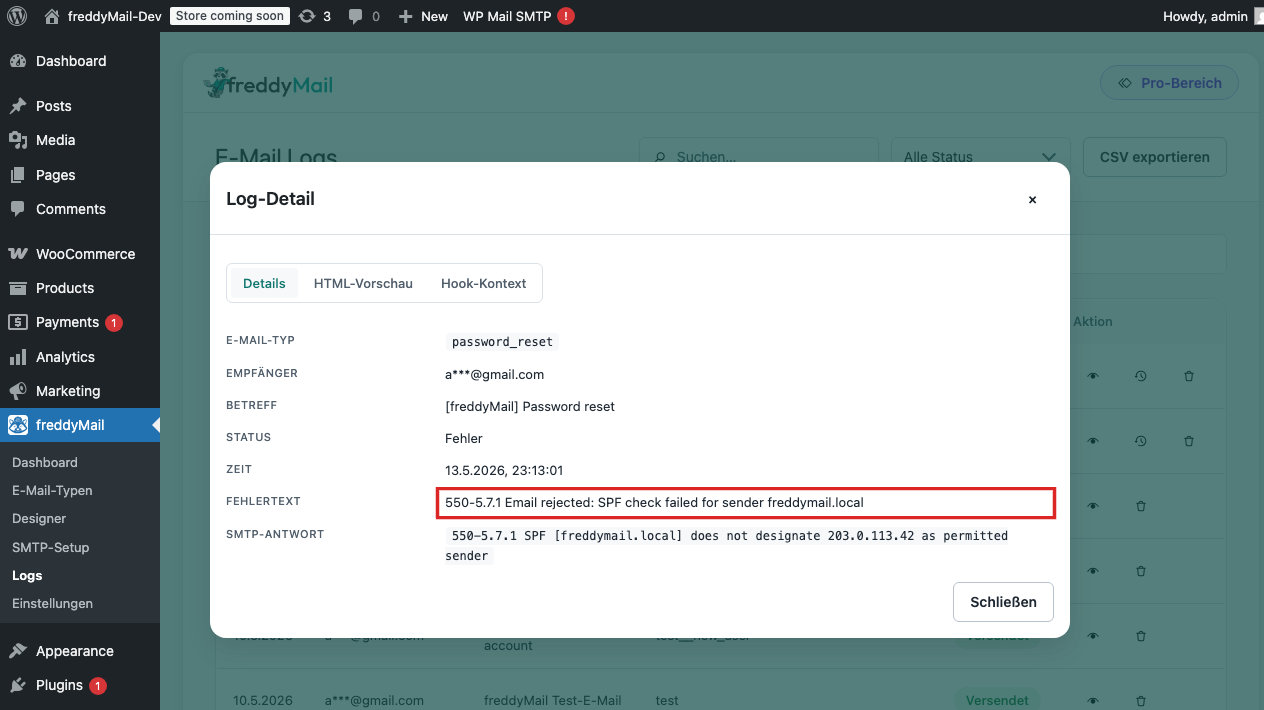 Annotated
 Email looks different from the preview
First actions:
- Embed the logo via HTTPS (not inline Base64).
- Buttons as table-based
<a>constructs, not CSS<button>s. - Font sizes in pixels, not
remorem. - Test dark mode in iOS Mail.
WooCommerce mail is missing
- In WooCommerce > Settings > Emails, check whether the mail type is enabled.
- Manually set the order to the triggering status (e.g. Processing).
- Open FreddyMail Logs and check whether an entry was created.
- If Unknown type: WooCommerce may send through a custom hook that isn’t mapped yet.
License is not recognised
- Reconcile the Freemius purchase email with the license key.
- Verify in your Freemius account that the license is registered on the current domain.
- When changing domains, deactivate the license on the old domain first.
- Refunds and downgrades may update with a delay.
Log stays empty
When no mails appear in the log, WordPress is either not sending through FreddyMail or not sending at all.
- Deactivate any other SMTP plugin (WP Mail SMTP, Post SMTP, Easy WP SMTP) — only one may be active.
- In FreddyMail > Settings, verify that delivery is active.
- Trigger the event manually (e.g. password reset on the WP login page).
- Check the server mail queue and
wp-content/mu-plugins/for custom mail filters.